News

Latest updates, insights, and announcements from FamilyOFX and the family office community.

Strategies — name what the book is for
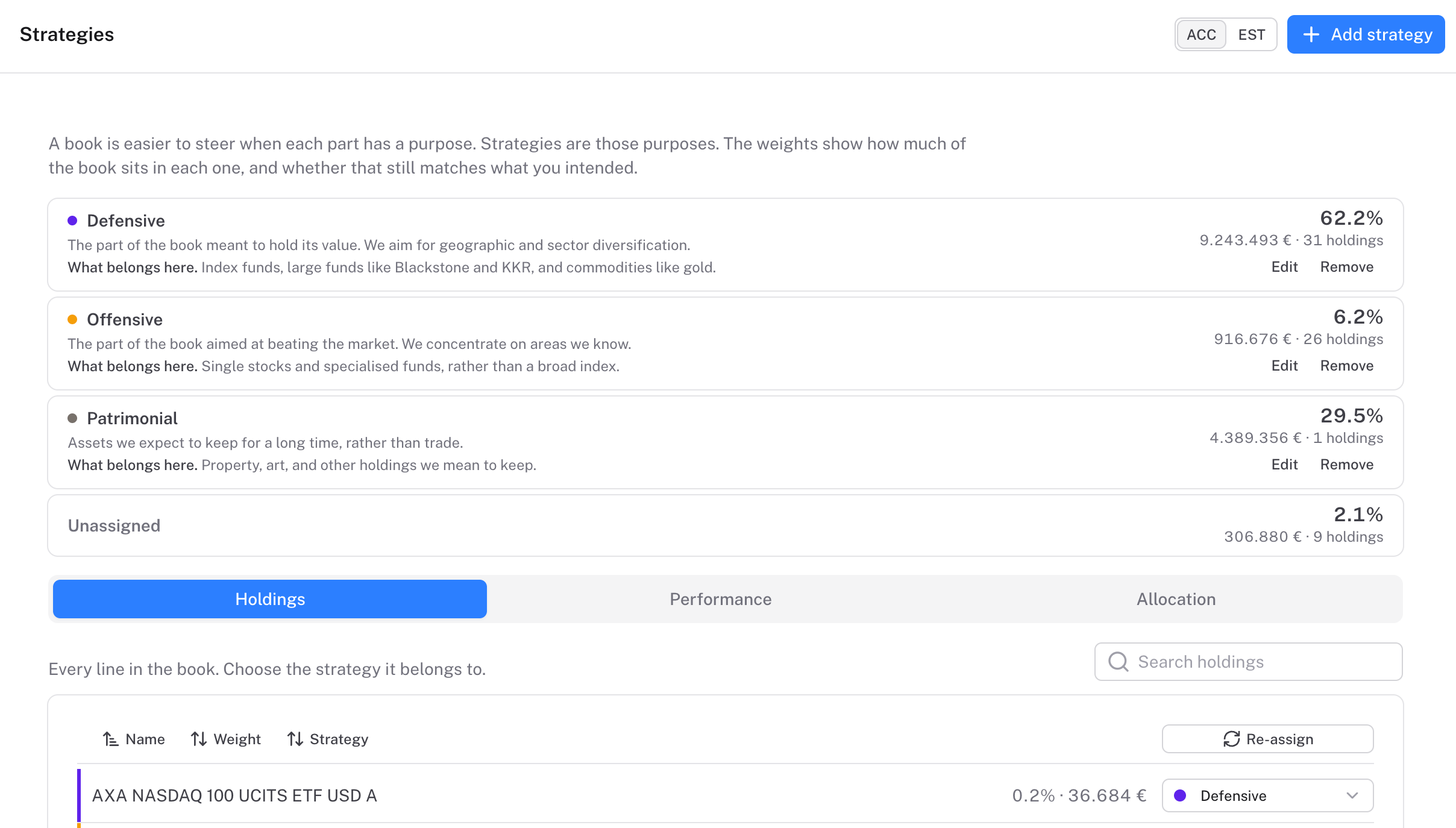
A book is easier to steer when each part has a purpose. Strategies names those purposes, shows the weight in each, and whether that still matches what you intended.
Strategies — name what the book is for

A book is easier to steer when each part has a purpose. Asset class, geography, and liquidity describe the holding. Strategy names the job it is doing. The weights show how much of the book sits in each purpose, and whether that still matches what you intended.

Three purposes to start. Defensive is the part meant to hold its value. Offensive is the part aimed at beating the market, concentrated where you know the ground. Patrimonial is what you mean to keep: property, art, and the long hold. They are a place to begin. Make them yours — the names, the colours, the number of sleeves. The written Strategy in your constitution stays the story. Strategies is that story, measured against the book.

See whether the book still agrees with you. Each sleeve shows its weight, how it has done, and how the mix has moved over the years. Read a report by strategy when the question is about purpose, and about whether the money is still doing the job you gave it. That is the conversation to have with the family: this is what we said the capital was for, and this is where it sits.

Open Strategies in the app. The guide is here when you want the detail: Strategies.
Reports — faster, more accurate, better built-in layouts

The reports engine is faster, figures follow the period you pick, and the standard reports — starting with Today — ship with a rebuilt set of widgets.
Reports — faster, more accurate, better built-in layouts

Reports are faster. Widget results are cached and reused until transactions, valuations, or deals change, so opening a report does not rebuild every card from scratch. While a card is still loading it shows a faint placeholder in its own shape. The rest of the page stays usable.

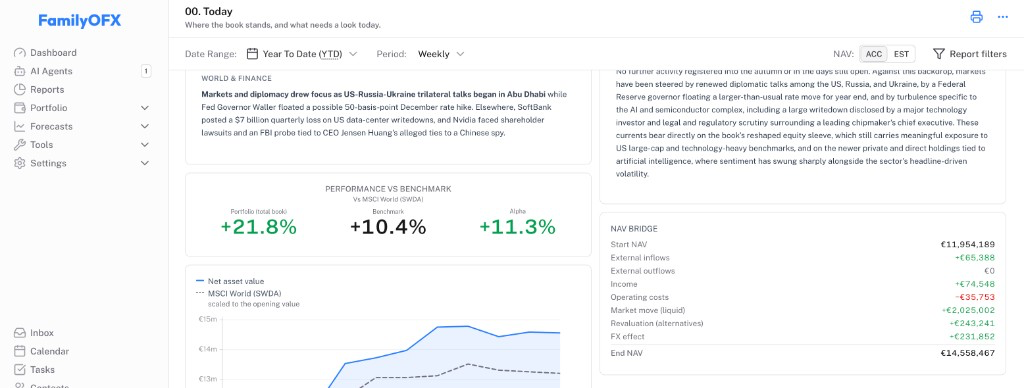
The figures are tighter. Tiles follow the period you select. A savings or cash balance with no purchase, and a sleeve whose statement gives a year-start total, counts as money already invested at the period start. A deposit, buy, or capital call in the period does not. Performance vs benchmark shows the total book, the account benchmark, and alpha. Every report ends with the reporting currency, the as-of date (period end, DD/MM/YYYY), and the age of the oldest mark when it is 90 days or more. The info control on a widget spells out AUM, NAV, YTD, IRR, and the rest.

The built-in reports are rebuilt. Today opens with AUM, Liquid book, Alternatives NAV, and Cash, then the 15-day news summary, the executive summary for the selected period, performance vs benchmark, the NAV bridge, and the NAV chart. The standard set runs on from there: Constitution, Portfolio overview, Liquid assets, Alternative assets, Real assets, Treasury and liquidity, Costs, Philanthropy, and Operations.

Guide: Reports and Today and report cadence.

MCP is available

Connect Claude, ChatGPT, or Codex to one FamilyOFX organisation. Reads run live. Writes wait in AI Agents until you accept them.
MCP is available

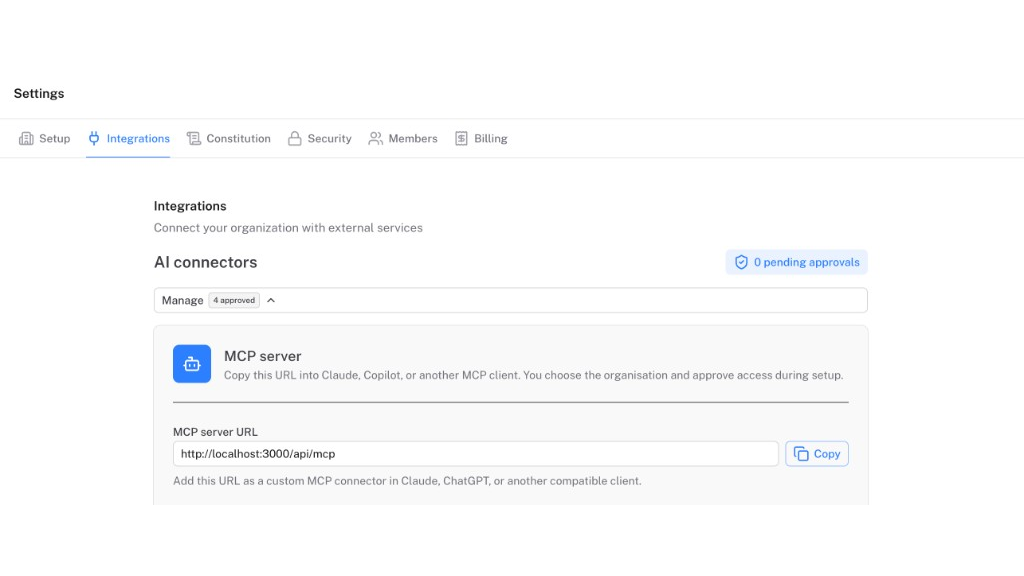
MCP is available. Claude, ChatGPT, and Codex can connect to one FamilyOFX organisation over https://familyofx.com/api/mcp.

Sign in with FamilyOFX and pick the organisation on the consent screen. Read tools return live portfolio, documents, contacts, tasks, deals, and calendar for that office. Create and update tools do not change records until you accept the pending action under AI Agents. The connector cannot move money.

Install FamilyOFX from the ChatGPT plugin listing, or add it as a custom MCP connector. Manage and revoke clients under Settings → Integrations → AI connectors → Manage.

Setup: MCP connections.

Hundreds of models, via OpenRouter

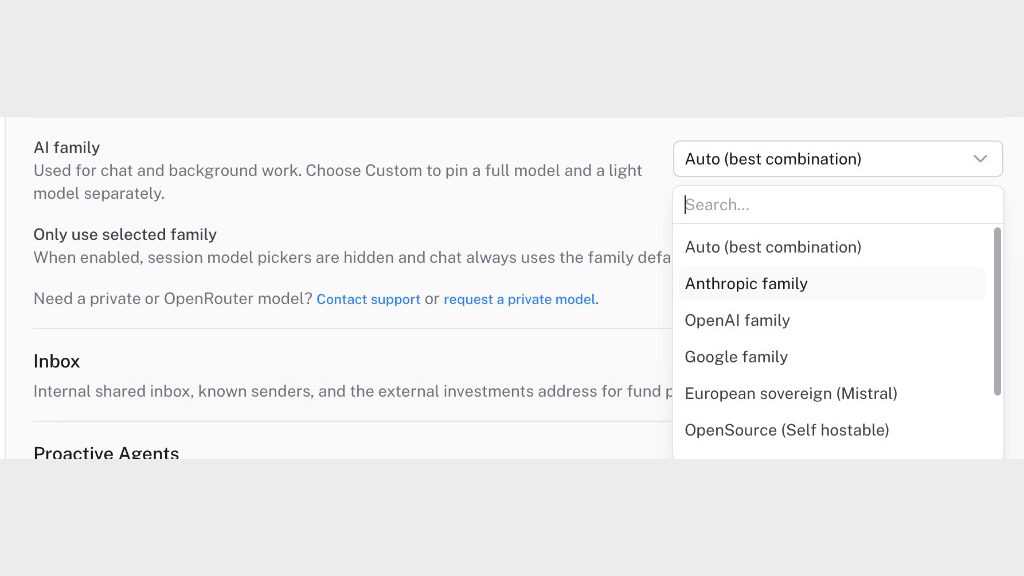
FamilyOFX now routes AI through OpenRouter (acquired by Stripe). Hundreds of models in chat—including open-source ones like Gemma 4 that we can run privately on our infrastructure so your data never leaves our systems.
Hundreds of models, via OpenRouter

OpenRouter is now how FamilyOFX runs AI. You may not have heard of it; Stripe has acquired OpenRouter, which is why we are comfortable routing on it—serious, secure infrastructure, not a side project. One routing layer, hundreds of models—Claude, GPT, Gemini, Mistral, Llama, and the rest of the catalog—without locking the office to a single provider.

In the product you get a curated featured set for chat and generation. Need something else? Request any model available on OpenRouter through support and we will enable it for your office.

That catalog includes open-source models such as Gemma 4. You can try them in the product first; if you want your data never to leave our systems, we can run those same models privately on FamilyOFX infrastructure for you.

Pick for depth, speed, cost, or data-residency. New models land as they appear on OpenRouter; you do not wait on a platform rewrite.

Tax — an early forecasting tool

We have started work on a tax module. It is still early days, but there is already a forecasting tool that estimates liability from your holdings, planned sales, and country rules.
Tax — an early forecasting tool

Still early — we have begun a tax module for the office. Rules, country defaults, and estimates will keep evolving; treat what you see as a first cut, not a filing.

The forecasting tool is already in the product. Pick an entity and tax year, describe what you might do (sell half of NVIDIA in November), and FamilyOFX estimates income, CGT, dividends, and related buckets against your transactions and brackets. Add past returns if you want the model to calibrate against prior filings.

Indicative only—for planning conversations, not a substitute for your accountant.

New models and Scenarios

Model upgrades including Opus 5 and GPT-5.6 Sol, plus Scenarios—prompt a market shock and see a five-year portfolio path against a living baseline.
New models and Scenarios

Models — Claude Opus 5, GPT-5.6 Sol, and related upgrades across chat and generation, so you can pick depth, speed, and provider per task.

Scenarios — describe a shock in plain language (tech outperformance, rate spike, delayed PE exit) and get a five-year portfolio path versus a living baseline, with line-by-line impacts and rationale you can inspect and regenerate.

Cashflow planning — forecasts driven by prompts

Plan capital calls, distributions, and dividends per holding. Open prompt turns a plain-language schedule into a live forecast that updates as actuals arrive.
Cashflow planning — forecasts driven by prompts

Formula paths cover PE / venture (Takahashi-Alexander / Yale model) and debt funds. Holdings stay off the global forecast until you opt in.

With Open prompt, write the schedule in plain language—“annual farm dividend ~120k EUR, flat for 3 years then +5%”—and FamilyOFX turns that into dated predictions. When actuals post, the plan reconciles so the forecast stays honest.

Vaults — secure KYC and succession documents

Encrypted vaults for sensitive family files, with KYC and Succession flavours that handle silence differently when approvals time out.
Vaults — secure KYC and succession documents

KYC is for passports and residency proofs: if nobody answers an access request in time, it is denied—compliance stays locked unless someone actively says yes.

Succession is for wills, passwords, and executor material: if nobody answers in time, it is approved (silence counts as consent), so the plan can run when the people who should reply no longer can.

You can still layer a password, owner approval, and multi-party approvers on either type. Each vault also gets an inbound address so documents can be forwarded in without leaving the secure container.

Calendar, new models, and a stronger chat experience

We shipped a calendar, three new AI models including Mistral for full EU data-sovereignty paths, and broad chat improvements and fixes—while onboarding more families and folding their feedback into the product.
Calendar, new models, and a stronger chat experience

What we shipped

We have been onboarding more families and operators, and their day-to-day feedback is going straight into the roadmap. This release bundles the biggest asks we kept hearing: time-bound work in one place, more choice in where AI runs, and a chat experience that feels dependable.

Calendar

A dedicated calendar is now part of the workspace so deadlines, meetings, and office milestones sit alongside investments and documents—not in a side channel nobody checks.

Three new models, including Mistral for EU sovereignty

We added three new models to power assistance across the product. Among them is Mistral, so teams who need full EU data-sovereignty paths can align processing with that requirement without compromising on quality.

Chat improvements and fixes

We invested heavily in chat reliability and quality of life: clearer threading, faster responses under load, and a long list of bug fixes from real sessions. If something felt off before, please try again—we are iterating weekly from what we see in support and in-product feedback.

What is next

We are continuing to onboard more people and incorporate feedback as fast as we can validate it. If you are already in the workspace, thank you for the specificity you send us—it genuinely steers the next cuts.

Beta Launch & Family Testing Program

We are excited to announce our beta launch with testing with a few adventurous families!
Beta Launch & Family Testing Program

Beta Launch & Family Testing Program

We're thrilled to announce that we've officially launched our beta program! After months of development and preparation, we've partnered with a few select families to test our platform in real-world scenarios.

What's Happening

Our beta testing families are putting our platform through its paces, helping us identify areas for improvement and ensuring we deliver the best possible experience when we launch publicly.

Key Features Being Tested

  • Core Platform Functionality - Testing all main features with real users
  • User Experience Flow - Ensuring intuitive navigation and workflows
  • Performance & Reliability - Monitoring system performance under real usage
  • Feedback Collection - Gathering insights for final improvements

What's Next

Based on feedback from our beta families, we'll be making final refinements and preparing for our public launch. Stay tuned for more updates!

We're grateful to our beta families for their time and valuable feedback. Their input is invaluable in making our platform the best it can be.


Want to be among the first to know when we launch publicly? Sign up for our newsletter to get notified!